Failure analysis
Failure analysis in KF starts with by selecting one item and annotating events in its Event tab. Events can be failure modes, issues, problems, etc. You annotate events directly in the affected item. Here we did that with the Battery which is a component of Bicycle Model A.
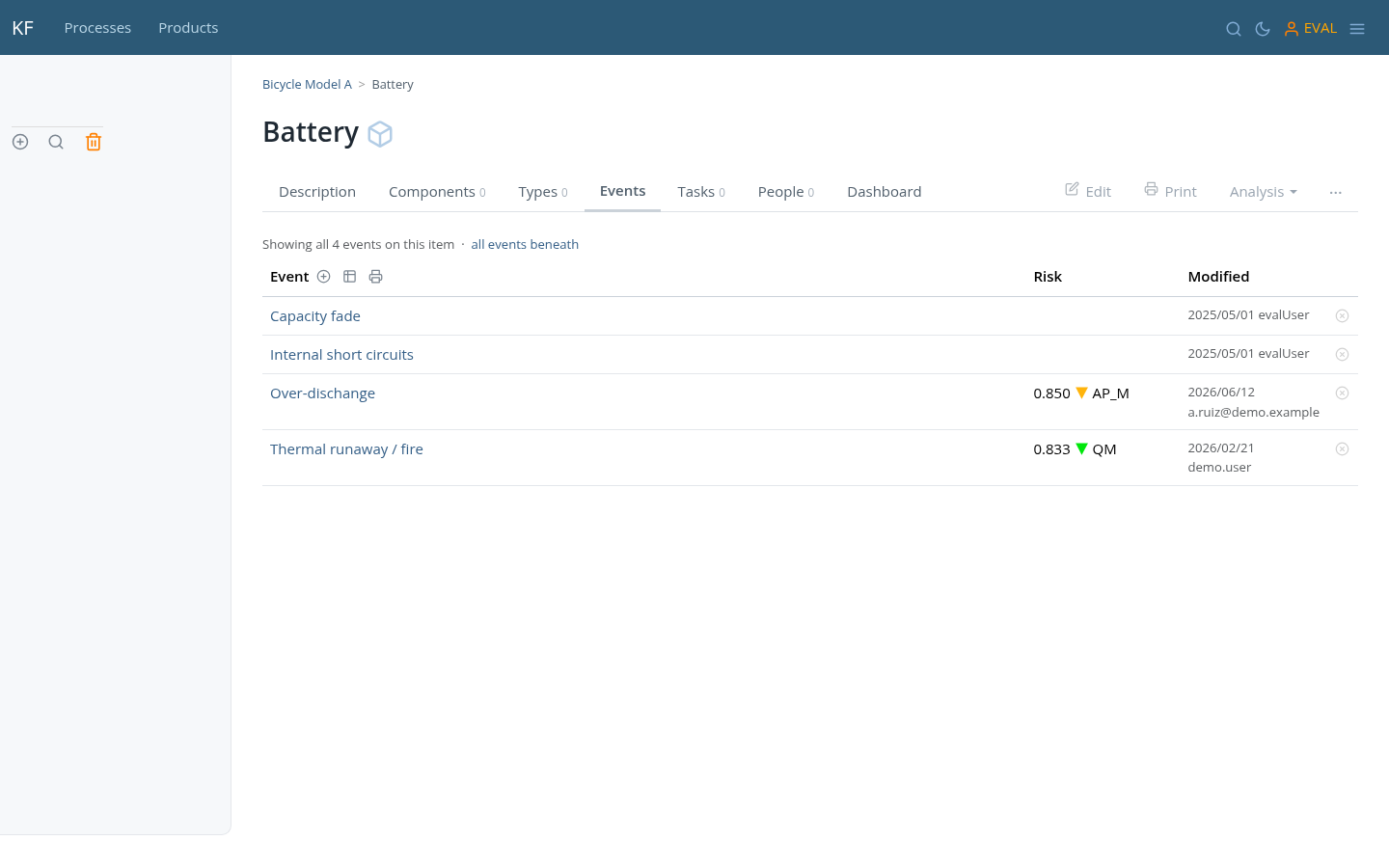
Adding events is simple. Click the  icon pointed above and the following form opens:
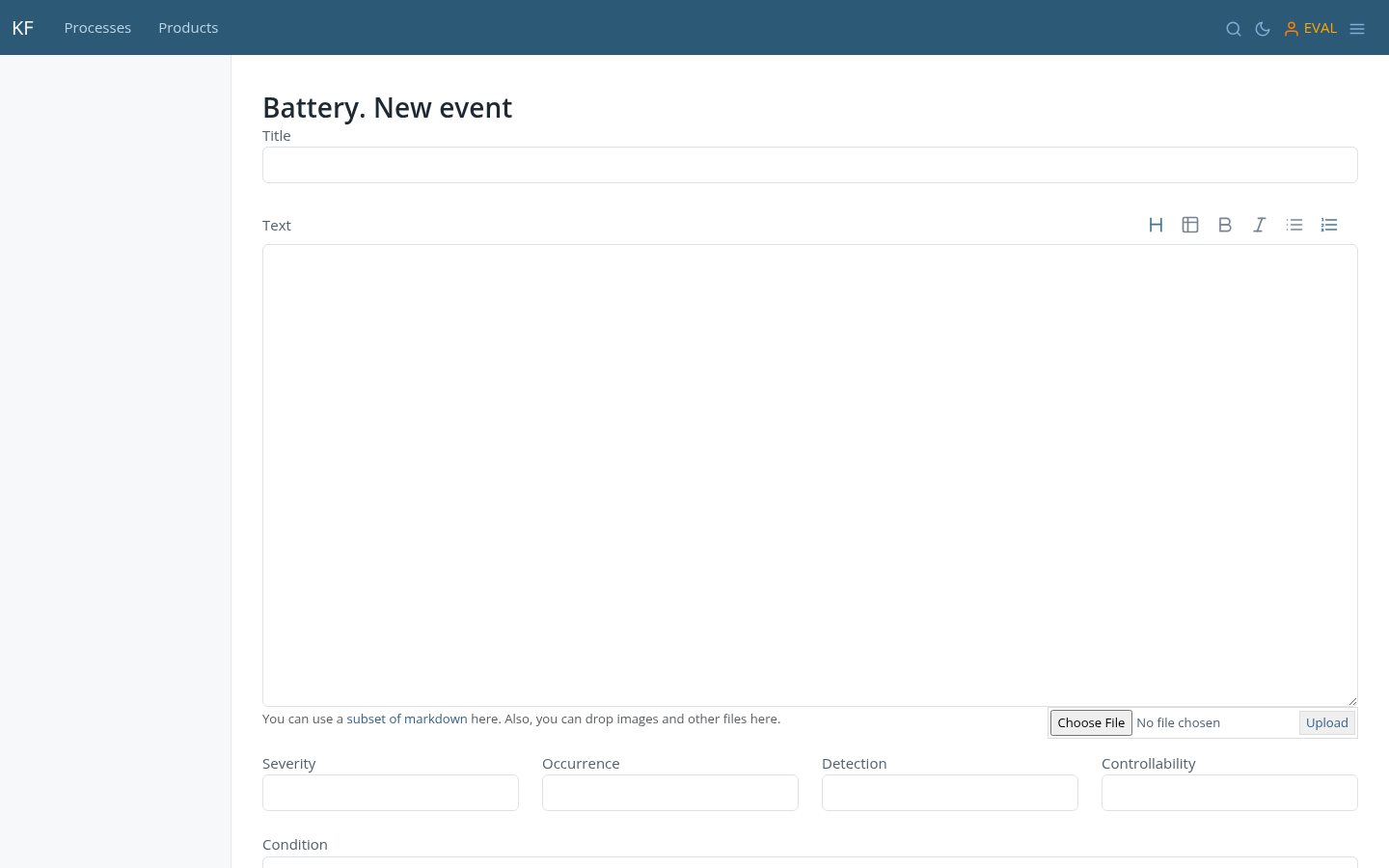
You only need to fill in the Title; the rest of the fields are optional but, as with any item, you can use the Text field to go deep into the failure mode or problem, and make a complete report if needed. The fields Severity, Ocurrence/Likelihood and Detection/Controllability are used to set the risk level of the event, which is explained in detail here.
Once you have annotated some events to some items, you can display the failure report [ ]:
]:
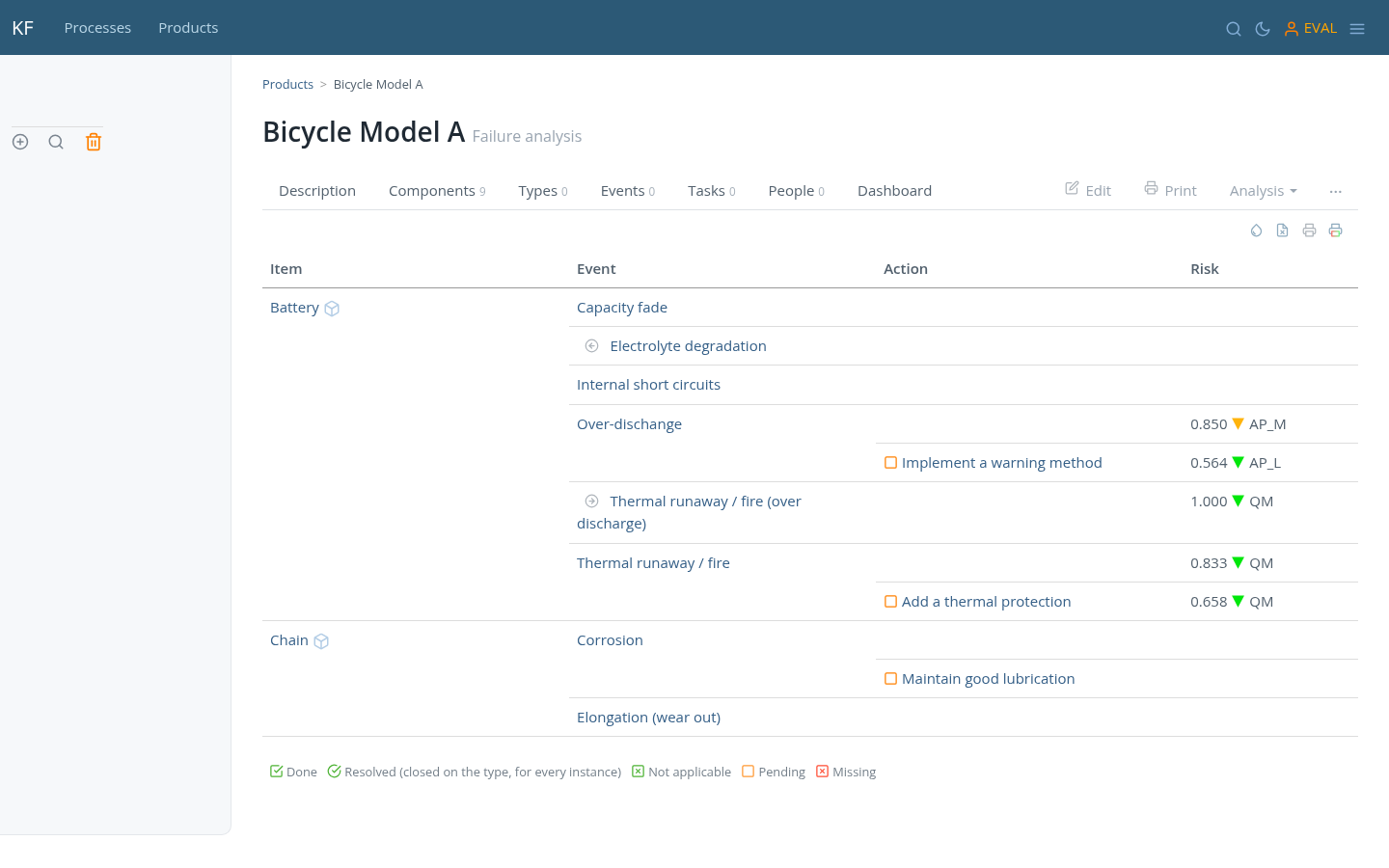
In the previous image, you can see that events related to the item under investigation and its components are displayed in the Failure Analysis report. In this example, we chose to view the report for Bicycle Model A, which includes events linked to its components Battery and Chain. The report format is a simplified version of the FMEA (Failure Mode and Effects Analysis) reports commonly used in the automotive and other industries.
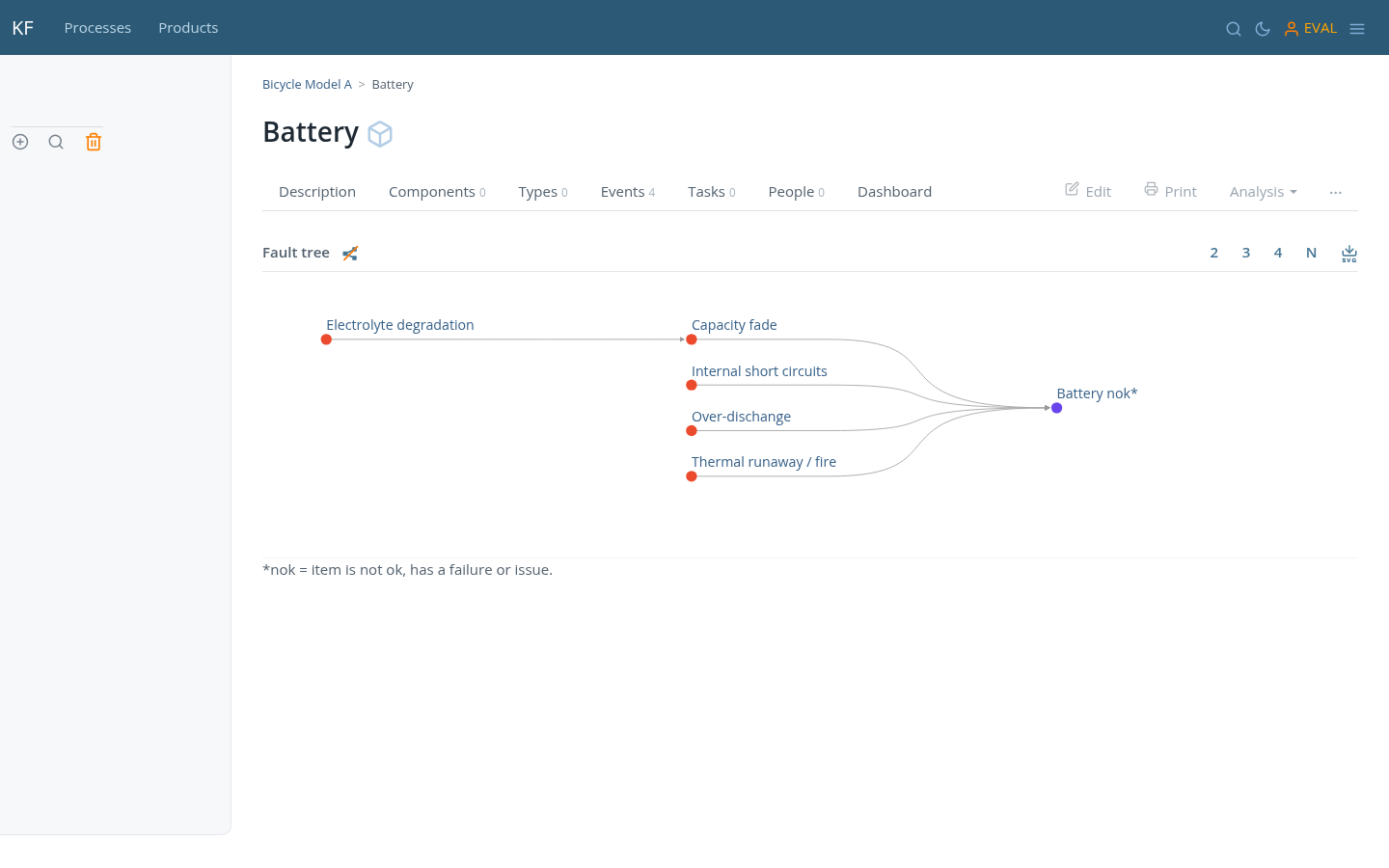
You may chose to display the Fault tree [ ] at any moment. As you keep adding components and events to your item, those will show up automatically in the tree:
A simplified FMEA format
Failure Mode and Effects Analysis (FMEA) is a structured method used to identify potential failure points within a system, evaluate their effects, and prioritize actions to mitigate associated risks. Traditionally used in engineering, manufacturing, and safety-critical domains, FMEA helps teams focus on preventing issues before they occur by examining how components, processes, or systems might fail, why they might fail, and what the consequences would be.
Truke KF offers a simplified implementation of FMEA using a 4-column format, which preserves the essence of the method while avoiding the bureaucratic complexity found in many of the quality related forms. This format still complies with core standards and methodologies (like IEC 60812, DRBFM, DRBTR, VDA/AIAG 2019 Handbook, etc).
The four columns in KF’s FMEA are:
- Item: the element being analyzed. This could be a component, subsystem, process step, or functional unit. In KF, each item is a structured knowledge object, potentially linked to a hierarchy (like a Bill of Materials) or other documents.
- Event: A stack of failure-related elements including failure modes, causes, and effects. These are arranged vertically under the same item to maintain contextual coherence. This vertical grouping enables users to understand the chain of failure reasoning at a glance, instead of scattering it across wide tables.
- Action: Preventive, corrective, and detection actions associated with the failure entries. Each action is also a KF item with its own attributes (including scheduling, status, and S-O-D values), allowing for full traceability, progress tracking, and integration with Gantt views if desired.
- Risk: A synthesis of the severity, occurrence and detection or controllability values. These risk indicators can follow classic or modern interpretations, including automatic application of the Action Priority system (AP) as defined in the VDA/AIAG FMEA Handbook 2019, and ISO 26262’s ASIL matrix when safety-relevant labels are applied.
The strength of KF’s 4-column FMEA lies in its simplicity and flexibility. Instead of scattering information across numerous disjointed fields, the structure is intentionally kept tight and readable. At the same time, the underlying model remains powerful: KF supports inheritance, risk progression (“before and after” action effects), modular linking of detection mechanisms, and integration with broader design or operational documents.
By avoiding over-complication and unifying diverse analysis approaches under a consistent structure, KF’s FMEA format allows teams to focus on what really matters—understanding failures, planning meaningful actions, and improving designs with confidence and clarity.
DRBFM and DRBTR
Both methods originate from Toyota and address a limitation of classical FMEA: a full FMEA re-analysis is expensive, and most of the time only a fraction of the design has actually changed. Rather than repeat the full analysis, both methods focus attention precisely where new risk has been introduced.
DRBFM — Design Review Based on Failure Mode
DRBFM asks: what changed from the reference design, and what new failure modes could those changes introduce? The central concept is the concern — not a systematic enumeration of all failure modes, but the specific worries an experienced engineer has about a particular change point. The baseline (what was working before) is taken as given; the review concentrates only on departures from it.
Mapping to KF
The reference design is represented as a type. The new or changed design is an instance of that type. This immediately splits the failure analysis into two layers:
- Inherited events (origin arrow pointing to the type) — carry-over failure modes from the baseline. These are already known and addressed. They appear in the FMEA report but do not need re-review unless the change affects them.
- Instance-specific events (no origin arrow, added directly to the instance or its changed components) — the DRBFM concerns. These are the failure modes that the change could introduce and that have no precedent in the baseline.
The FMEA report for the instance therefore naturally produces the DRBFM view: the full picture is there for traceability, but the new concerns are visually distinct by the absence of an origin reference. Filtering or focusing on those events gives the change-driven review that DRBFM requires.
Once a concern has been reviewed and resolved, it can be promoted to the type (via the inverted checklist) so that future design changes of the same kind inherit the lesson automatically.
DRBTR — Design Review Based on Test Results
DRBTR asks: what did testing reveal, and what concerns does that raise? Where DRBFM is triggered by a design change, DRBTR is triggered by test data. The loop is: run the test → document the result → identify any concern the result surfaces → attach actions to address it.
Mapping to KF
A test report is represented as a task — a document to be produced, linked to an action or directly to a component. When a test result reveals a problem or unexpected behaviour, that observation becomes an event on the relevant item, with the test result referenced in the event’s description or attached as a document.
The event then follows the standard failure analysis flow: severity, occurrence, and detection are set; actions are attached; risk is tracked. The FMEA report captures test-driven events alongside design-driven ones, giving a unified picture of all known failure modes regardless of whether they were identified analytically or empirically.
Concerns that recur across multiple test campaigns, or across multiple products of the same type, are candidates for promotion to the type — closing the loop back to DRBFM and ensuring the lesson reaches future designs before testing begins.